Setfairly: Elevating Your Designs with Elegant Typography
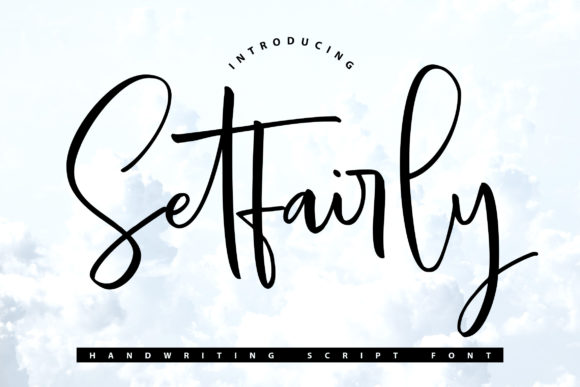
In the world of visual communication, the difference between a design that feels generic and one that resonates deeply often comes down to a single element: the font. While many designers rush to pick the first available typeface, Setfairly stands out as a stylish and incredibly elegant script font designed specifically for those moments when you need to convey warmth, sophistication, and a personal touch. Whether you are crafting wedding invitations or rebranding a boutique business, understanding how to leverage this specific typeface can transform your project from ordinary to extraordinary.
However, just because a font looks stunning in a preview does not mean it will perform well in your final layout. Many creators make the mistake of assuming that an elegant script is universally applicable without considering context, legibility, or technical implementation. This article serves as a practical guide to help you navigate the nuances of using Setfairly effectively, ensuring your designs achieve the high-quality results you intend.
Understanding the Power of Setfairly
Setfairly is more than just a decorative typeface; it is a tool for storytelling. Its fluid strokes and refined details mimic the natural flow of handwriting, yet it maintains enough structure to remain readable at various sizes. This balance makes it particularly valuable for applications where personality is paramount. When used on wedding invitations, it sets a tone of romance and exclusivity immediately. For thank you cards or greeting cards, it adds a layer of intimacy that blocky sans-serif fonts simply cannot replicate.
Businesses and entrepreneurs often underestimate the impact of typography on brand perception. A logo or business card featuring Setfairly can signal that a brand values attention to detail and craftsmanship. It suggests a premium experience, which is crucial for small business owners and freelancers looking to differentiate themselves in crowded markets. The key lies in recognizing that this font is not meant to be the hero of every text-heavy page, but rather the star of the spotlight moments.
Pitfalls in Selection and Application
Even with a beautiful font like Setfairly, poor execution can lead to designs that feel cluttered or difficult to read. One of the most common errors occurs when users attempt to use script fonts for body text. Because of its intricate letterforms and varying stroke weights, Setfairly can become visually exhausting when applied to long paragraphs. This mistake directly impacts readability and user satisfaction, causing readers to disengage before they finish consuming your message.
Another frequent oversight involves the pairing of fonts. Designers sometimes try to match Setfairly with other scripts that have similar characteristics, resulting in a chaotic visual hierarchy. When two script fonts compete for attention, the design loses its elegance and becomes confusing. Instead, the goal should be contrast. Pairing the fluidity of Setfairly with a clean, geometric sans-serif or a classic serif creates a harmonious balance that guides the eye naturally through the content.
Tech-savvy users must also be mindful of file formats and licensing. Downloading a font without verifying its usage rights can lead to legal complications later, especially for commercial projects like logos or marketing materials. Furthermore, failing to check the kerning (the spacing between letters) in your design software can ruin the aesthetic. Script fonts rely heavily on precise spacing to look professional; default settings in some programs may leave gaps that break the illusion of a continuous handwritten line.
Impact on Usability and Brand Perception
The consequences of these mistakes extend beyond mere aesthetics. If a wedding invitation is hard to read due to poor font pairing or excessive decoration, guests may struggle to find essential details like dates and locations. In a business context, a logo that is too ornate or poorly spaced can appear unprofessional, undermining the trust you are trying to build with potential clients. Efficiency is also compromised; if you spend hours adjusting tracking and leading manually because you did not plan the typography correctly, you are wasting valuable time that could be spent on other aspects of your project.
Cost is another factor. Buying a license for a premium font like Setfairly is an investment. If you misuse it or fail to integrate it properly, that investment yields no return. You might end up needing to hire a designer to fix the issues, turning a simple download into a significant expense. Therefore, taking the time to understand the strengths and limitations of the font before starting your design process is a crucial step in avoiding unnecessary costs.
Best Practices for Implementation
To avoid these pitfalls, start by defining the purpose of your design. Ask yourself: Is this the right moment for a handwritten touch? If the answer is yes, Setfairly is likely an excellent choice. However, limit its use to headlines, accents, signatures, or short phrases. Keep the supporting text in a neutral, highly legible font to ensure clarity. This approach ensures that the elegance of Setfairly enhances the design without overwhelming the viewer.
When selecting colors, consider the contrast ratio. Light script fonts against white backgrounds can sometimes lack sufficient contrast, making them difficult to read, especially for those with visual impairments. Opt for darker shades of black, deep navy, or charcoal gray to maintain the sophisticated look while ensuring accessibility. Additionally, always test your design at different sizes. A script that looks magnificent on a large poster may become illegible on a mobile screen or a small business card. Adjust the size and weight accordingly to maintain legibility across all media.
Licensing and technical preparation are non-negotiable. Before downloading Setfairly, review the license agreement carefully. Ensure that the terms cover your intended use, whether it is for personal projects, client work, or digital advertising. Once installed, verify that the font files are compatible with your design software. Check the character set to ensure it includes special symbols, ligatures, and alternate characters that add to the script's charm. Using these advanced features can elevate your design from standard to bespoke.
Evaluating Your Choices
Before finalizing any project, take a step back and evaluate your typographic choices critically. Does the font communicate the intended emotion? Is the hierarchy clear? Would a friend or colleague easily read the text without squinting? If you are unsure, seek feedback from peers or mentors. Sometimes a fresh pair of eyes can spot spacing issues or color clashes that you have missed after staring at the screen for hours.
Remember that Setfairly is a powerful asset in your design toolkit, but like any tool, it requires skill to wield effectively. By focusing on proper pairing, respecting legibility, and adhering to technical best practices, you can create designs that are not only beautiful but also functional and effective. Whether you are designing a heartfelt wedding suite or a sleek corporate identity, the right application of this elegant script will ensure your message lands exactly as you intended.
Ultimately, the goal is to create a seamless connection between your brand or event and your audience. A well-chosen font like Setfairly facilitates this connection by adding a human element to digital and print media. Avoid the common traps of overuse and poor planning, and instead, embrace the thoughtful integration of typography. Your designs will benefit from the extra care, resulting in higher quality outcomes and greater satisfaction for everyone involved.